Icon2Image

Icon2Image
License:
Trial version
Language:
English
Developer:
Developer's website
OS:
Mac OS X
Updated:
See detailed info

Softonic review

Nick Mead

“Create your own thumbnail images”

by Nick Mead about Icon2Image

One of the best things about Macs compared to Windows PCs is that the icons are so much better. It's a small detail but it makes working on a Mac that much more pleasant.

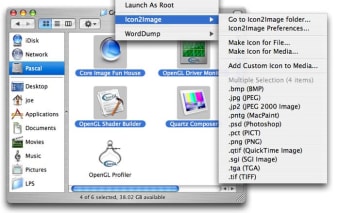
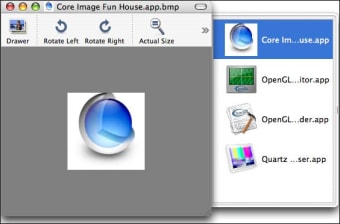
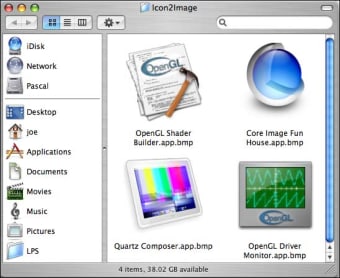
Icon2Image is designed to help you get the best out of your Mac and create thumbnail images in multiple formats that will grace OS X. Icon2Image allows you to create image thumbnails of files, folders and disk icons in just about any image formats. The problem with Icon2Image is that the installation is a little complicated. It's not just a case of dragging the program icon to your applications folder.

First what you need to do is place the contextual menu plugin in "/Library/Contextual Menu Items/". You must then place the preference pane in "/Library/PreferencePanes". You then have to logout and log back in to load the contextual menu which is a bit annoying. Finally, to activate the Icon2Image Demo you need to open the "Password" tab of the Icon2Image System Preference pane to activate this product for the first time.

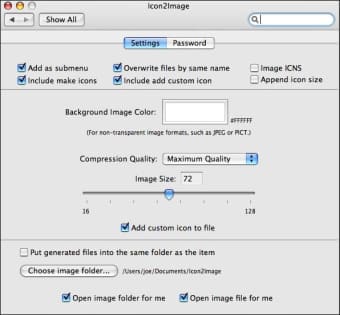
This rather annoying installation process sets the mood for what it quite an awkward product to use and it does make for easy access via Finder's context menu. An accompanying system preference pane enables you to configure various options such as the background color or size of the generated images. It gives you a ton of image formats to save in but the overall feeling is one that Icon2Image should have been made much easier for the first time user to run.

Icon2Image can help you create image thumbnails in many different formats but the hassle of installation and operation may put-off first time users.

Pros
  • Creates images in multiple formats
Cons
  • Very awkward installation procedure
Download Icon2Image 1.3.2

Icon2Image is virus free

We have analyzed the latest version of Icon2Image with 30 antivirus engines and it is virus free. See analysis results.

TESTED VIRUS FREE - Softonic GUARANTEED

Review and rate Icon2Image

Your avatar

Your opinion is important.
Help other users - be the first to review this program.

Review
  1. Maximum: 75 characters

  2. See example

Pros and Cons
Rate
  1. What rating would you give Icon2Image?

    You need to fill in all fields

    • Usability:

      Not rated
    • Stability:

      Not rated
    • Installation:

      Not rated
    • Functionality:

      Not rated
    • Appearance:

      Not rated
    • Overall rating:

      Not rated
  2. Don't worry, we won't make your email address public.

You're not allowed to share serial numbers, cracks, etc. or link to pages that contain them. If you do, your user account will be deleted, your IP address logged and legal action will be taken.

Get started - just ask a question!

Write a title for your question.

Alternativesto Icon2Image

  • In English:
    Contenta Converter
    Contenta Converter

    Convert, resize and rename photos in batches

    Softonic rating:
    • 7/10
    User rating:
    • 10/10
  • Free:
    Poladroid
    Poladroid

    Give your photos that classic Polaroid look

    Softonic rating:
    • 8/10
    User rating:
    • 10/10
Compare with Icon2Image
Download rank: Multiformat Converters

15 of 13

Softonic rating:
  • Not bad
  • 6/10
Your rating:
Your rating
  • 0

Review and rate this program

Top Downloads: Multiformat Converters

  • United States
  • Global

  1. Powerful photo editing suite

Reviews of Icon2Image in other languages